Purchase Quotations
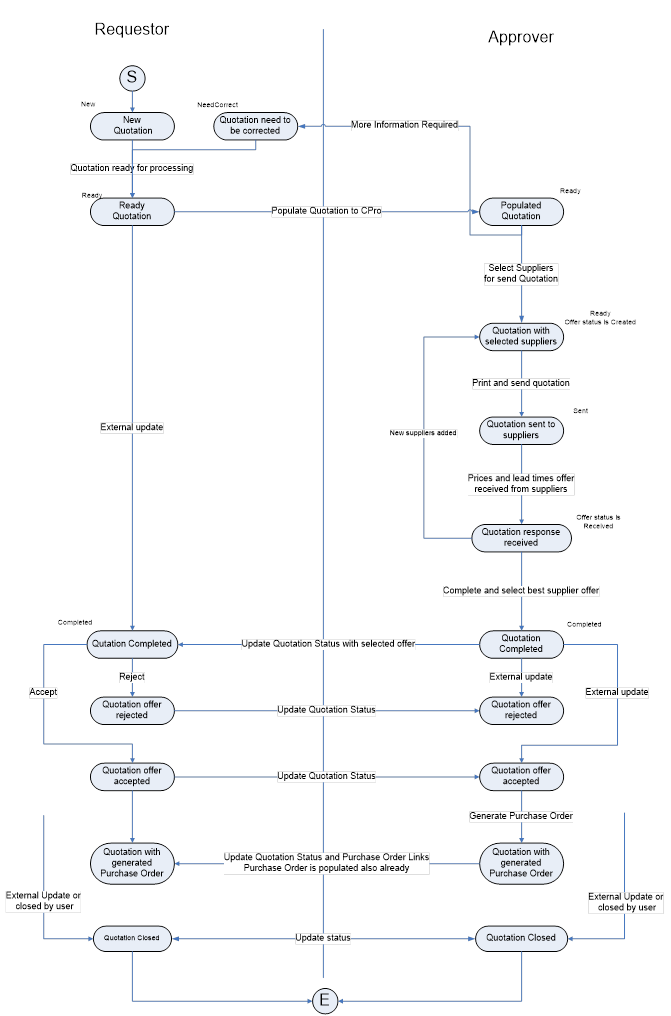
Purchase Quotation module has been provided to support the full process of managing quotations for Inventory items. The process assumes following steps:
• Quotation document is raised to be deployed to one or more suppliers.
• The quotation is emailed to all suppliers selected.
• Quotation details from suppliers are fed back to the quotation document and the preferred supplier offer is selected.
• The quotation is then rejected or accepted for order.
• Once the quotation has been accepted, the purchase order can be created based on the details from the quotation.
• The quotation is closed.
The process can be split between two responsibility groups of requestor and approver.
All steps covered by the process are visualized on the diagram below.
More:
 Generating Purchase Quotations
Selecting Suppliers and Sending
Filling quotation Feedback data from
suppliers
Accepting / rejecting the quotation